Are you finding that your searches return too many records? Using wildcards like “”, * and – can narrow down your results to the records you really need. We’ll walk you through using them step by step.
Natalie Webb isn’t your average genealogist. With a 25-year career as a project manager, technical trainer, and all-around computer wizard, she’s got the skills to tackle even the trickiest of technical problems. Plus, she’s a seasoned genea
With WorldCat and other websites where you can use boolean searches, the connector terms must always be in all CAPS if you want them to work. Good information and a really good overview of boolean and wildcard searches.
Gedcom files are useful for transferring family tree data but they aren’t easy to read or work with on their own. In this TechZone, we’ll explain how you can use AI to easily extract information from a gedcom file and create word documents or spreadsheet.
Gedcom files are useful for transferring family tree data but they aren’t easy to read or work with on their own. In this TechZone, we’ll explain how you can use AI to easily extract information from a gedcom file and create word documents or spreadsheet.
In this TechZone video, we’ll explain how you can create AI-generated images with ChatGPT to enrich your genealogy research and presentations. Discover practical tips for visualizing historical contexts, creating custom family tree illustrations, and bringing ancestral stories to life.
In this TechZone video, we’ll explain how you can create AI-generated images with ChatGPT to enrich your genealogy research and presentations. Discover practical tips for visualizing historical contexts, creating custom family tree illustrations, and bringing ancestral stories to life.
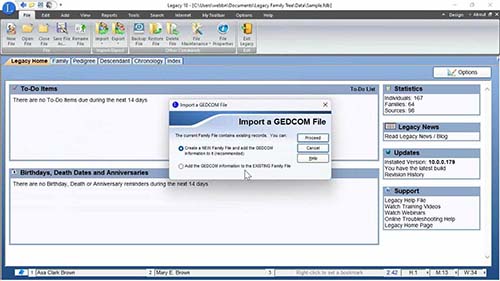
Gedcom files are the universal standard for transferring genealogy information from one program format to another. In this TechZone video learn how to create and export a gedcom file from an online tree and then import that file into a desktop genealogy program. Next we'll export from a desktop program and import into a different online tree.
Gedcom files are the universal standard for transferring genealogy information from one program format to another. In this TechZone video learn how to create and export a gedcom file from an online tree and then import that file into a desktop genealogy program. Next we'll export from a desktop program and import into a different online tree.
Boosting Your Genealogy Research: How to Leverage the Google Translate Chrome Extension
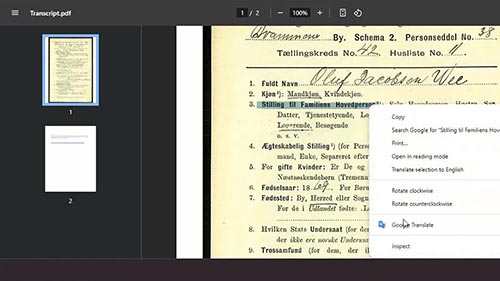
Did you know that the Google Translate tool you rely on as a genealogist also comes in a convenient browser extension? With this extension, you can instantly translate text right on the page you’re viewing, without the hassle of switching tabs or opening a new window. It’s a seamless way to break down language barriers while staying focused on your research!
Did you know that the Google Translate tool you rely on as a genealogist also comes in a convenient browser extension? With this extension, you can instantly translate text right on the page you’re viewing, without the hassle of switching tabs or opening a new window. It’s a seamless way to break down language barriers while staying focused on your research!
Améliorer vos recherches généalogiques : comment utiliser l’extension Chrome Google Translate
Les sous-titres et la voix de cette vidéo ont été doublés en français à l'aide de l'IA.
Saviez-vous que l'outil Google Translate sur lequel vous comptez en tant que généalogiste est également disponible en tant qu'extension de navigateur pratique ? Avec cette extension, vous pouvez traduire instantanément du texte directement sur la page que vous consultez, sans avoir à changer d'onglet ou à ouvrir une nouvelle fenêtre. C'est un moyen fluide de surmonter les barrières linguistiques tout en restant concentré sur vos recherches !
Les sous-titres et la voix de cette vidéo ont été doublés en français à l'aide de l'IA.
Saviez-vous que l'outil Google Translate sur lequel vous comptez en tant que généalogiste est également disponible en tant qu'extension de navigateur pratique ? Avec cette extension, vous pouvez traduire instantanément du texte directement sur la page que vous consultez, sans avoir à changer d'onglet ou à ouvrir une nouvelle fenêtre. C'est un moyen fluide de surmonter les barrières linguistiques tout en restant concentré sur vos recherches !
By registering, you are submitting your information to Legacy Family Tree Webinars and agreeing to let us use it to contact you.
Thank you for registering!
You should receive a confirmation email with a link to the webinar soon.
You’ll also receive a reminder both the day before and one hour before the webinar begins. Didn’t receive a confirmation email?
You successfully registered for %s.
You should receive a confirmation email with a link to the webinar soon.
You’ll also receive a reminder both the day before and one hour before the webinar begins. Didn’t receive a confirmation email?











 Facebook
 X
X


With WorldCat and other websites where you can use boolean searches, the connector terms must always be in all CAPS if you want them to work. Good information and a really good overview of boolean and wildcard searches.
Great explanation of these tool in searching in databases! Thanks Natalie